Role-based access control (RBAC)
Overview
ECI uses RBAC (Role-Based Access Control) to govern what organization users can access. Instead of granting permissions directly to a user, you bundle them into roles and assign roles. That way, users doing the same job get a consistent set of permissions quickly.
┌────────┐   assign  ┌────────┐  contains  ┌────────────┐
│  User  │ ────────▶ │  Role  │ ─────────▶ │ Permissions │
└────────┘           └────────┘            └────────────┘
The four built-in roles
ECI ships four preconfigured roles for common scenarios. Built-in roles cannot be edited or deleted.
| Role | Korean name | Best fit |
|---|---|---|
| Owner | 소유자 | Whoever manages the whole organization. Keep this list small |
| Contributor | 기여자 | Researchers and developers who create and operate VM, storage, and network resources |
| Support | 서포터 | Ops support staff. Currently has the same permissions as Contributor |
| Reader | 뷰어 | Interns, auditors, external partners — anyone who only needs read access |
Permission summary by role
| Area | Owner | Contributor | Support | Reader |
|---|---|---|---|---|
| Read resources (VMs, Kubernetes, network, storage, metrics) | ✓ | ✓ | ✓ | ✓ |
| Create / update / delete resources | ✓ | ✓ | ✓ | ✗ |
| VM web console access, Kubernetes API access | ✓ | ✓ | ✓ | ✗ |
| Read alert rules and actions | ✓ | ✓ | ✓ | ✓ |
| Create / update / delete alert rules and actions | ✓ | ✓ | ✓ | ✗ |
| Read prices and usage | ✓ | ✓ | ✓ | ✓ |
| Issue / revoke access tokens | ✓ | ✓ | ✓ | ✓ |
| List roles | ✓ | ✓ | ✓ | ✓ |
| List users, change roles, delete users, invite users | ✓ | ✗ | ✗ | ✗ |
| Create / edit / delete custom roles | ✓ | ✗ | ✗ | ✗ |
| Read the audit log | ✓ | ✗ | ✗ | ✗ |
For the exact permission list of each role, click the role under Members > User Roles and check the Permissions tab. An access token inherits the permissions of the user who issued it, so a token issued by a Reader can only read.
Permission code structure
Permission codes are 4–5 segments long and start with ACL.:
ACL.{section}.{subsection}.{action}                              # non-Resource sections
ACL.Resource.{Compute|Network|Storage}.{resource}.{action}       # Resource section
Examples
ACL.Resource.Compute.VirtualMachine.CREATE: create a VMACL.Resource.Storage.BlockStorage.UPDATE: edit block storageACL.Resource.Compute.VirtualMachineAllocation.ACCESS_WEB_CONSOLE: VM web console accessACL.Billing.Billing.READ: read usageACL.User.UserInvite.CREATE: send user invitationsACL.Alert.AlertRule.CREATE: create alert rules
The Resource section adds an intermediate Compute / Network / Storage grouping, making it 5 segments. A few items (like Resource.OrganizationResourceSummary) skip the intermediate grouping.
Actions
| Action | Meaning |
|---|---|
CREATE | Create a resource |
READ | Read a resource |
UPDATE | Update a resource |
DELETE | Delete a resource |
ACCESS_WEB_CONSOLE | VM web console access (VM only) |
ACCESS_API | Kubernetes API access (Kubernetes clusters only) |
Sections and subsections
| Section | Subsections / resources |
|---|---|
| General | Notice, Organization, Region |
| Infra | BlockStorageImage, InstanceType, Zone |
| Billing | Billing |
| Pricing | Pricing |
| Metric | Metric |
| Alert | AlertRule, AlertActionTemplate, AlertEvent |
| User | ACL, User, UserAudit, UserAccessToken, UserInvite, UserRole |
| Resource.Compute | VirtualMachine, VirtualMachineAllocation, VirtualCluster, VirtualClusterAllocation, KubernetesCluster, KubernetesNodePool |
| Resource.Network | VirtualNetwork, Subnet, NetworkInterface, PublicIp, Vpn, LoadBalancer |
| Resource.Storage | BlockStorage, BlockStorageSnapshot, BlockStorageSnapshotScheduler, ObjectStorage, ObjectStorageUser, ObjectStorageUserGrant, ParallelFileSystem, ParallelFileSystemMember |
| Resource (direct) | OrganizationResourceSummary |
Granting CREATE/UPDATE/DELETE without READ means the user can't see the resource list, so they can't actually use the permission. When you grant create/update/delete on a resource, grant READ on the same resource too.
Creating a custom role
You can define roles tailored to your organization's workflow.
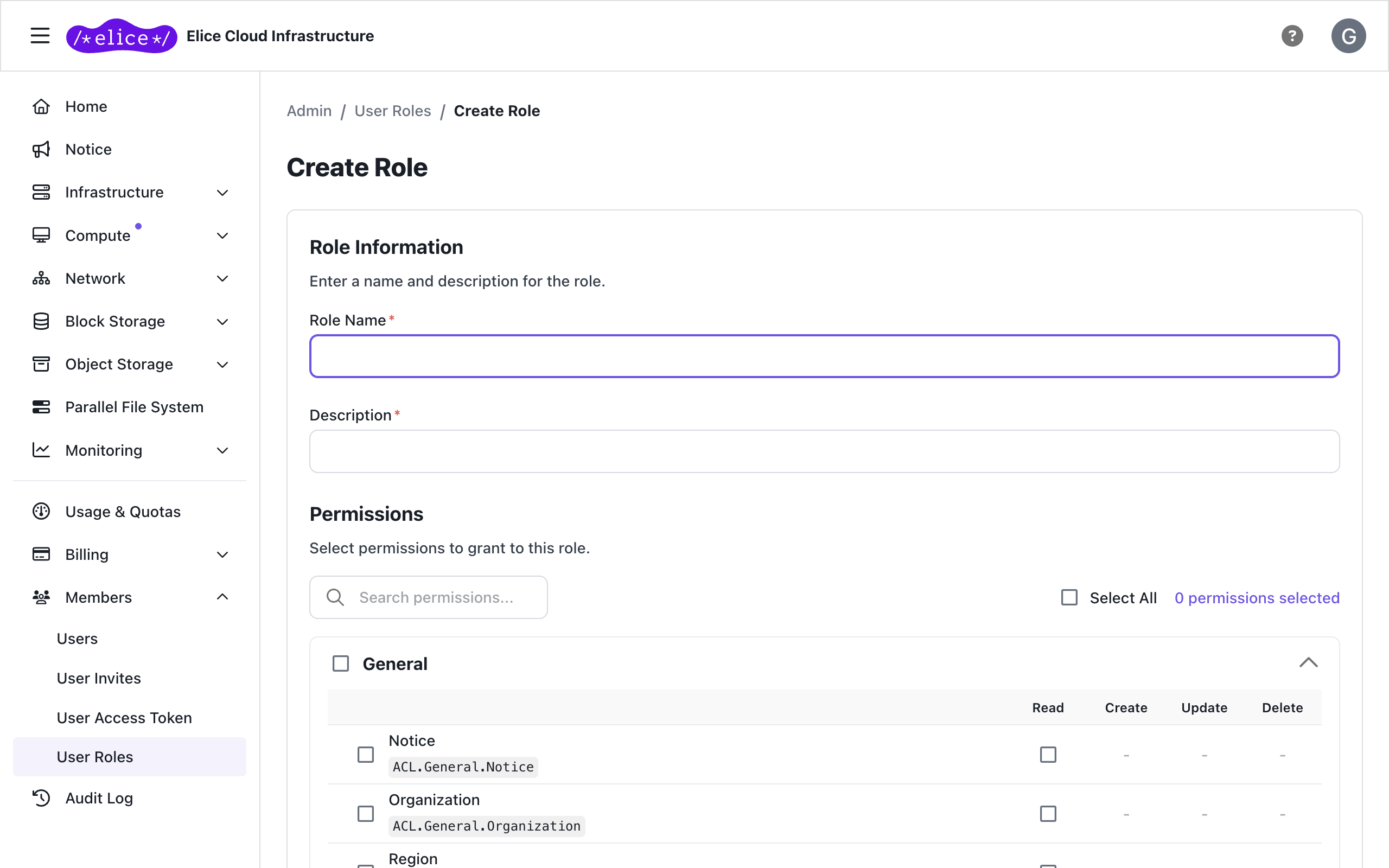
Step 1: Create the role
- Go to Members > User Roles.
- Click Create Role.
- Enter the Role Name and Description.
- Select the permissions you need under Permissions. You can switch the view mode (Chips / Matrix / Table) or search for permissions.
- Click Create.
The detail page of the role you created has Overview, Permissions, and Settings tabs. Edit the name, description, and permissions, or delete the role, on the Settings tab.
Step 2: Assign the role to a user
- Click the user in Members > Users.
- On the Settings tab of the user detail page, add the role you created.
- Click Save.
With multiple roles, the union of all roles' permissions is applied. Composing small-grained roles tends to be easier to manage.
Custom role examples
| Role | Permissions (summary) | Best fit |
|---|---|---|
| VM admin | ACL.Resource.Compute.VirtualMachine.*, ACL.Resource.Compute.VirtualMachineAllocation.* (including ACCESS_WEB_CONSOLE), ACL.Resource.Compute.VirtualCluster.* | Dedicated VM operator |
| Kubernetes operator | ACL.Resource.Compute.KubernetesCluster.* (including ACCESS_API), ACL.Resource.Compute.KubernetesNodePool.* | Cluster operations |
| Network reader | ACL.Resource.Network.{VirtualNetwork,Subnet,NetworkInterface,PublicIp,Vpn}.READ | Security / audit |
| Billing operator | ACL.Billing.Billing.READ + ACL.Pricing.Pricing.READ + ACL.Resource.OrganizationResourceSummary.READ | Finance |
| Storage admin | ACL.Resource.Storage.{BlockStorage,BlockStorageSnapshot,BlockStorageSnapshotScheduler,ObjectStorage,ObjectStorageUser,ParallelFileSystem}.* | Data operations |
| Alerts operator | ACL.Alert.{AlertRule,AlertActionTemplate,AlertEvent}.* + ACL.Metric.Metric.READ | SRE / on-call |
Full permission code list
The complete list of permission codes used in the API, CLI, and audit log. It maps 1:1 to the portal's permission-tree UI.
General / Infra / Billing / Pricing / Metric / Alert / User
General
| Code | Description |
|---|---|
ACL.General.Notice.READ | Read notices |
ACL.General.Organization.READ | Read organization |
ACL.General.Region.READ | List regions |
Infra
| Code | Description |
|---|---|
ACL.Infra.BlockStorageImage.READ | List OS images |
ACL.Infra.InstanceType.READ | List instance types |
ACL.Infra.Zone.READ | List zones |
Billing / Pricing / Metric
| Code | Description |
|---|---|
ACL.Billing.Billing.READ | Read usage and invoices |
ACL.Pricing.Pricing.READ | Read pricing |
ACL.Metric.Metric.READ | Read metrics |
Alert
| Code | Description |
|---|---|
ACL.Alert.AlertRule.{CREATE,READ,UPDATE,DELETE} | Alert rules |
ACL.Alert.AlertActionTemplate.{CREATE,READ,UPDATE,DELETE} | Alert action templates |
ACL.Alert.AlertEvent.READ | Read alert event history |
User
| Code | Description |
|---|---|
ACL.User.ACL.READ | List permissions |
ACL.User.User.{READ,UPDATE,DELETE} | Manage users |
ACL.User.UserAudit.READ | Read the audit log |
ACL.User.UserAccessToken.{CREATE,READ,DELETE} | Access tokens |
ACL.User.UserInvite.{CREATE,READ,DELETE} | User invitations |
ACL.User.UserRole.{CREATE,READ,UPDATE,DELETE} | Custom roles |
Resource — Compute / Network / Storage
Resource.Compute
| Code | Description |
|---|---|
ACL.Resource.Compute.VirtualMachine.{CREATE,READ,UPDATE,DELETE} | VM |
ACL.Resource.Compute.VirtualMachineAllocation.{CREATE,READ,UPDATE,DELETE} | VM start/stop |
ACL.Resource.Compute.VirtualMachineAllocation.ACCESS_WEB_CONSOLE | VM web console access |
ACL.Resource.Compute.VirtualCluster.{CREATE,READ,UPDATE,DELETE} | Virtual cluster |
ACL.Resource.Compute.VirtualClusterAllocation.{CREATE,READ,UPDATE,DELETE} | Virtual cluster run |
ACL.Resource.Compute.KubernetesCluster.{CREATE,READ,UPDATE,DELETE} | Kubernetes cluster |
ACL.Resource.Compute.KubernetesCluster.ACCESS_API | Kubernetes API access (kubeconfig issuance) |
ACL.Resource.Compute.KubernetesNodePool.{CREATE,READ,UPDATE,DELETE} | Kubernetes node pool |
Resource.Network
| Code | Description |
|---|---|
ACL.Resource.Network.VirtualNetwork.{CREATE,READ,UPDATE,DELETE} | Virtual network |
ACL.Resource.Network.Subnet.{CREATE,READ,UPDATE,DELETE} | Subnet |
ACL.Resource.Network.NetworkInterface.{CREATE,READ,UPDATE,DELETE} | Network interface |
ACL.Resource.Network.PublicIp.{CREATE,READ,UPDATE,DELETE} | Public IP |
ACL.Resource.Network.Vpn.{CREATE,READ,UPDATE,DELETE} | VPN |
ACL.Resource.Network.LoadBalancer.{CREATE,READ,UPDATE,DELETE} | Load balancer |
Resource.Storage
| Code | Description |
|---|---|
ACL.Resource.Storage.BlockStorage.{CREATE,READ,UPDATE,DELETE} | Block storage |
ACL.Resource.Storage.BlockStorageSnapshot.{CREATE,READ,UPDATE,DELETE} | Snapshot |
ACL.Resource.Storage.BlockStorageSnapshotScheduler.{CREATE,READ,UPDATE,DELETE} | Snapshot scheduler |
ACL.Resource.Storage.ObjectStorage.{CREATE,READ,UPDATE,DELETE} | Object storage |
ACL.Resource.Storage.ObjectStorageUser.{CREATE,READ,UPDATE,DELETE} | Object storage user |
ACL.Resource.Storage.ObjectStorageUserGrant.{CREATE,READ,UPDATE,DELETE} | Object storage user grants |
ACL.Resource.Storage.ParallelFileSystem.{CREATE,READ,UPDATE,DELETE} | Parallel file system |
ACL.Resource.Storage.ParallelFileSystemMember.{CREATE,READ,DELETE} | Parallel file system member (VM attachment) |
Resource (direct)
| Code | Description |
|---|---|
ACL.Resource.OrganizationResourceSummary.READ | Read organization-wide summary |
FAQ
Can I edit a built-in role (Owner/Contributor/Support/Reader)?
No, built-in roles cannot be edited or deleted. Create a new custom role if you need similar but different permissions.
The role I want to delete won't delete.
If the role is assigned to one or more users, it cannot be deleted. Remove or replace the role on those users first, then delete it.
How are menus the user can't access shown?
Menus the user has no read permission for are hidden. Buttons are disabled and show the required permission on hover, and where the user lacks permission to view part of a screen, the required permission code is shown in its place.
Next steps
- User management: invitations, role assignment, deletion
- Access tokens: assign roles to API tokens
- Audit log: track permission and resource changes