Access tokens
Overview
An access token is the credential you use in place of a password when calling the ECI API programmatically. Use it from Terraform, the CLI, CI/CD pipelines, or automation scripts. A token inherits the role (and therefore the permissions) of the user who issued it.
User.UserAccessToken.CREATEpermission. All four built-in roles have it.
Issuing a token
- Go to Members > User Access Token.
- Click Create Token in the top right.
- Choose the Expiry Period: pick one of
30 days,90 days,6 months, or12 months, or pick a date from the calendar withCustom Date. - Click Create.
- Copy the token value shown in the Access token issued dialog and store it somewhere safe.
Once you close the dialog, you cannot view the token value again. If you lose the value, get a new one by reissuing the token.
Anyone who gets it can use it immediately. Don't commit it to source control — keep it in environment variables or a secret manager (1Password, Vault, GitHub Secrets, and so on). If you suspect a leak, revoke the token right away and issue a new one.
To reduce leak risk, prefer short-lived tokens (30–90 days) and issue new ones on a regular schedule.
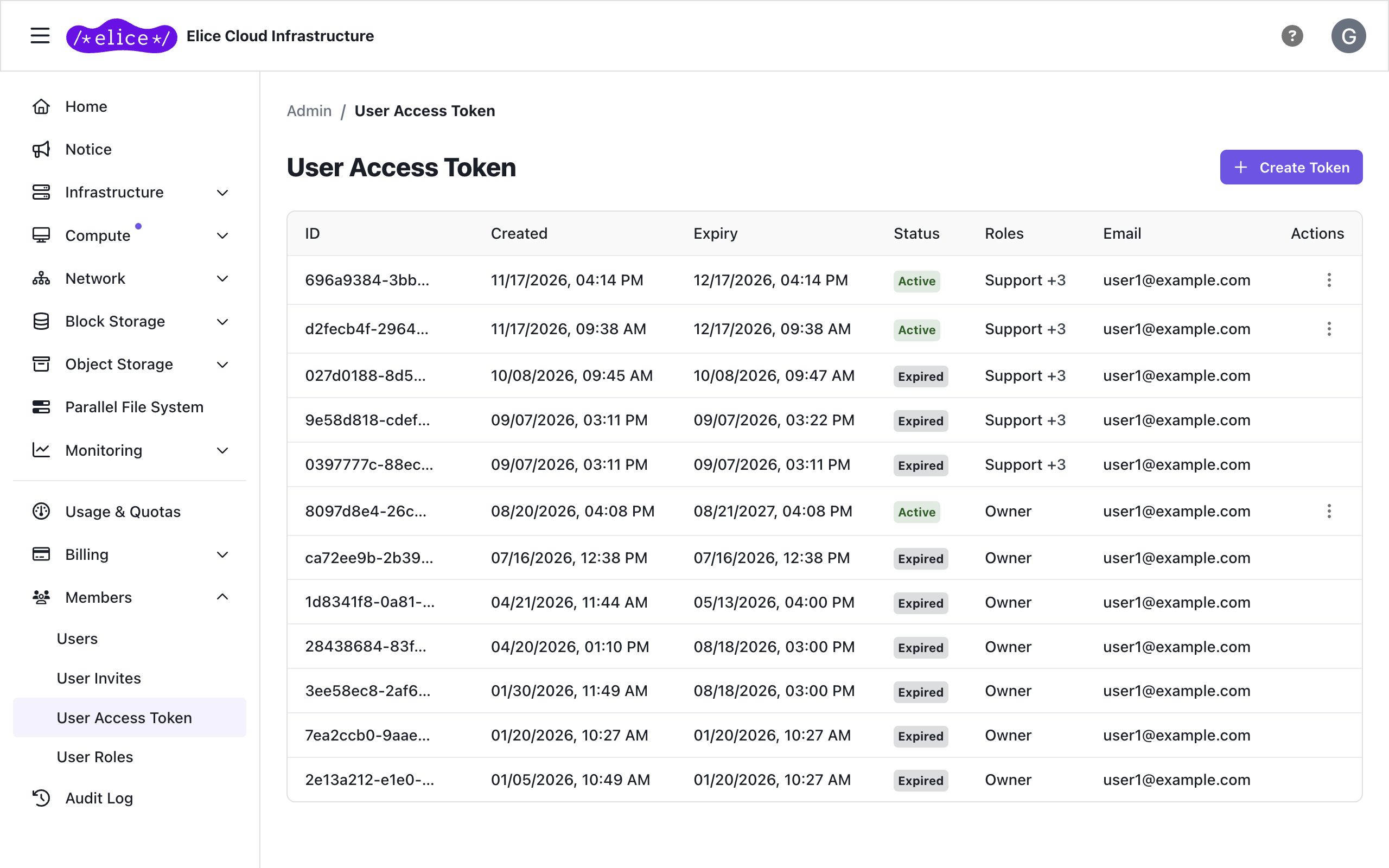
Viewing the token list
The token list does not show token values; it shows only the following information.
| Column | Description |
|---|---|
| ID | Token identifier. It can be copied, but it is not the token value |
| Created / Expiry | When the token was issued and when it expires |
| Status | Active, or Expired / Revoked for expired or revoked tokens |
| Roles | Roles the token inherits |
| The owner (issuer) of the token |
If any tokens were issued for Kubernetes cluster access, a Kubernetes cluster column is also shown.
Using a token
# Keep it in an environment variable
export ECI_ACCESS_TOKEN="your-token"

# Call the API (portal API base URL)
curl -H "Authorization: Bearer $ECI_ACCESS_TOKEN" \
  "https://portal.elice.cloud/api/user/resource/compute/virtual-machine"
The API base URL is your portal domain with /api appended.
- Commercial zone:
https://portal.elice.cloud/api - Public zone:
https://portal.gov.elice.cloud/api - Elice-integrated organization:
https://<organization>.elice.io/api
In Terraform, inject the token in the provider block (see Terraform overview for details):
provider "eci" {
  api_endpoint     = "https://portal.elice.cloud/api"
  api_access_token = var.eci_access_token
  zone_id          = var.zone_id
}
Never commit the token itself. Pass it through .env files, secret managers, or CI variables only.
Reissuing a token
Use this when you have lost the token value or want to replace it. Requires the User.UserAccessToken.CREATE permission.
- Click the ⋮ (three dots) menu on the target token row.
- Choose Reissue Token and confirm.
- The new token value is shown only once, so copy and store it right away.
The existing token stops working immediately, and a new token is issued with the same permissions and expiry date. Update any scripts and CI variables that used the old value.
Revoking a token
When a token has leaked or is no longer needed, revoke it right away. Requires the User.UserAccessToken.DELETE permission.
- Click the ⋮ (three dots) menu on the target token row.
- Choose Revoke Token.
- Review the warning and proceed with revoking.
Revocation takes effect immediately: any further API call with the token is rejected, and this cannot be undone. A revoked token remains in the list with the Revoked status.
If a token has been exposed, revoke it and issue a new one. Issuance and revocation are tracked in the Audit log.
Next steps
- Role-based access control (RBAC): design the permissions a token will inherit
- Audit log: track token issuance and revocation