Public IP
Overview
A public IP is a static IP that lets the internet reach a VM or a load balancer. Use it for SSH access, exposing a web server, and so on.
You're billed as long as the IP is allocated, even when it isn't attached to a VM. Delete public IPs you aren't using.
Creating a public IP
-
Under Network > Public IP, click Create Public IP.
-
Configure the following:
Field Description Public IP Name An identifying name Zone The zone the public IP will be allocated in (pick the same zone as the VM) DDoS Protection Allocate from the DDoS-protected IP pool; higher rate when enabled Disaster Recovery Provision a secondary IP in another zone for automatic NAT failover during a zone outage -
Click Create.
DDoS protection and DR determine which pool the IP is taken from. If a zone has no pool that supports the option, you can see an availability error like noAvailableDrIp.
Attaching to a VM
A public IP attaches to a network interface rather than the VM itself. You can create the network interface together with the VM at the network step, or pick an existing one, and attach the public IP to that network interface.
Option 1: At VM creation time
In the network step of the VM creation wizard, pick the public IP you've created in the public IP field.
Option 2: Attach after creation
- Pick the target IP in Network > Public IP.
- Open the Settings tab on the detail page and pick the VM's network interface in Attached Network Interface under Basic settings. You can also attach it with the Attach network interface button on the Overview tab.
- Click Save.
Disaster recovery public IPs can only attach to VMs / network interfaces with disaster recovery enabled, and standard public IPs can only attach to standard VMs / network interfaces (networkInterfaceDrMismatch).
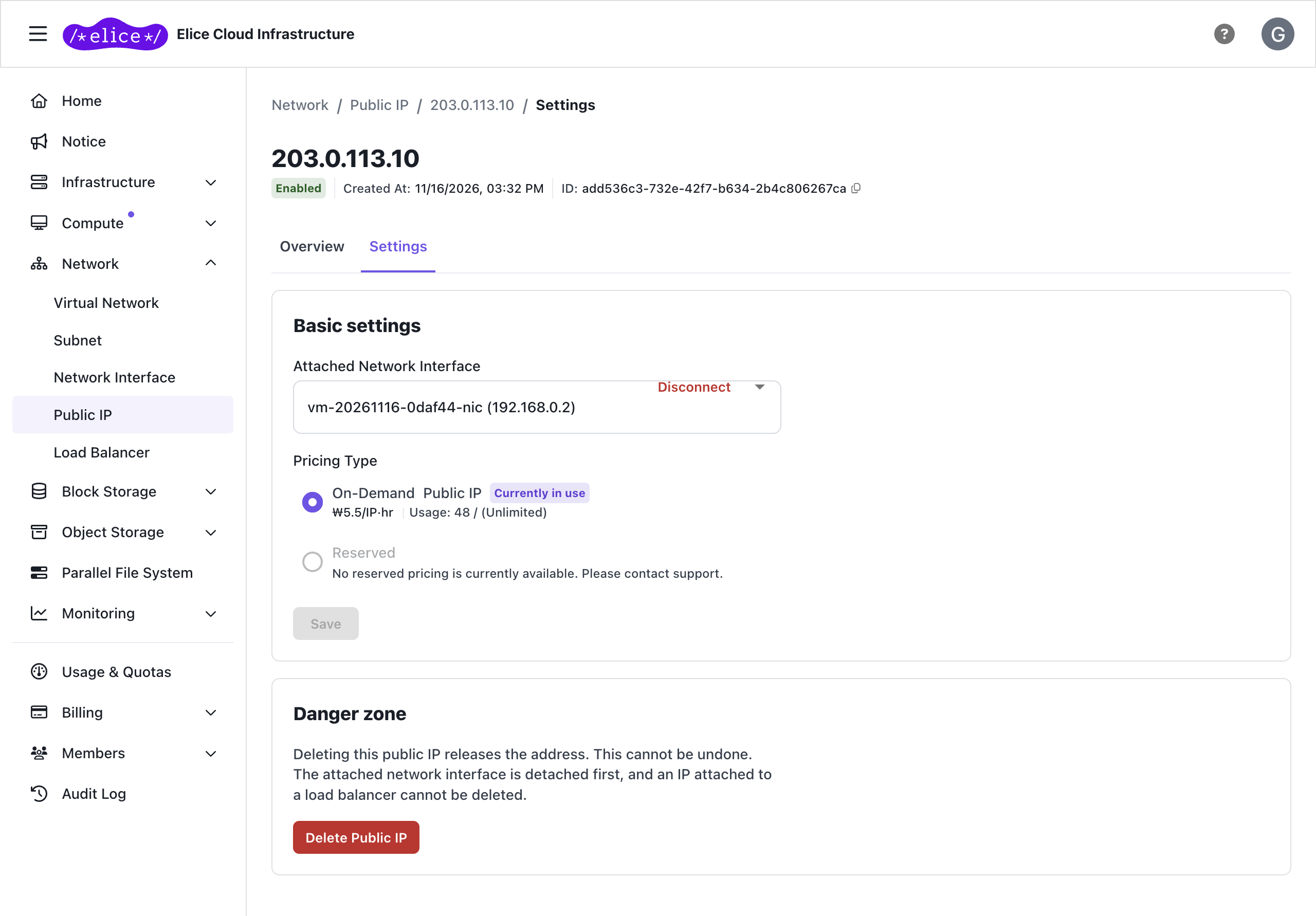
Attaching to a load balancer
A public IP can also be attached to a load balancer. It can be attached only when the load balancer is created, and cannot be swapped or detached afterwards.
- IPs already attached to another resource (a network interface or another load balancer) cannot be selected.
- While attached to a load balancer, the public IP cannot be deleted or attached to a VM's network interface.
- Deleting the load balancer automatically detaches the public IP, after which it can be attached to another resource or deleted.
Releasing a public IP
On the Settings tab of the public IP detail page, click Disconnect on Attached Network Interface to clear the selection, then Save to break the link to the VM.
To delete the IP itself, click Delete at the bottom of the Settings tab. Even if it is attached to a network interface, it is detached as part of deletion, so you don't need to detach it first. A public IP attached to a load balancer cannot be deleted.
Next steps
- Firewall: configuring inbound traffic rules
- Load balancer: distributing traffic arriving at a public IP across servers