Managing API Keys
Both Serverless and Dedicated endpoints provided by Elice AI Cloud require API key authentication for security.
Organization users call model endpoints with their issued API keys, while administrators can manage key issuance and policies in one place.
What Is an API Key?
An API key is a unique identifier used to authenticate users calling the Elice AI Cloud ML API.
What API Keys Are For
- Restricting API access to authenticated users
- Tracking calls per user
- Tracking cost and usage
- Enforcing call-limit policies
Managing API Keys
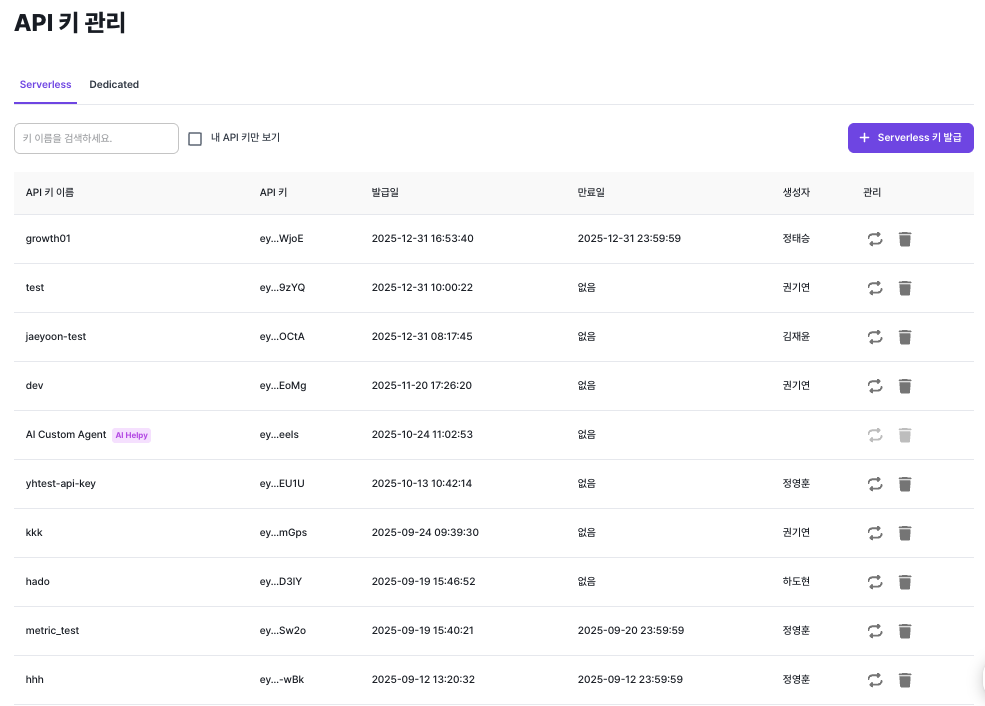
In ML API → API Key Management, you can manage Serverless and Dedicated keys separately.
What you can see
- API key name
- API key value (masked)
- Issued date
- Expiration date
- Creator
- Delete and reissue actions
This lets the organization control API usage transparently.
Issuing an API Key
Users can create API keys as needed.
- Open the API Key Management menu
- Choose the Serverless or Dedicated tab
- Click Issue Key
- Enter a key name and configure options
- Copy the key when issuance completes
⚠️ Warning: If you set an expiration date, the key will stop working after that date.
⚠️ Warning: A newly issued API key is only shown immediately after issuance — be sure to save it in a safe place.
Rate Limit

When issuing a Dedicated API key you can enable rate limiting. With this enabled, API calls are limited according to the API Rate Limit policy configured on each API.
Using an API Key
Include the issued API key in the Authorization header when calling the API.
Authorization: Bearer {YOUR_API_KEY}
Requests without an API key are not executed. Invalid or expired keys produce authentication errors.
Deleting an API Key

You can delete keys you no longer use. Deletion immediately disables API calls with that key.
Reissuing an API Key

If you have a security incident you can reissue the key; the previous key is invalidated immediately.
Things to Note
- Do not store API keys in public repositories (e.g., GitHub).
- Reissue the key immediately if it is exposed.
- Periodically delete keys you no longer need.
- Follow the principle of least privilege.